Webinar Invitation Email Examples

See webinar invitation email examples from Airtable, Calendly, DigiCert, and AWS, with notes on the subject lines and CTAs in each one.

[Webinar] Register for Manage projects your way with Airtable

Full email

Just the copy

[Webinar] Register for Manage projects your way with Airtable

Airtable email example with subject line “[Webinar] Register for Manage projects your way with Airtable”

Full email

Just the copy

[Webinar] Register for Manage projects your way with Airtable

Airtable email example with subject line “[Webinar] Register for Manage projects your way with Airtable”

Why we like it

Airtable sent their webinar invite email with a very clear purpose and call to action front and center. The title, the date, and a Register Now link come first, then an abstract image, and only then the specifics. The body says who the webinar is for (teams tracking projects and tasks), what it covers (a tour of the newest Project Management templates), and lists three things the template does before a second Register Now link.

Airtable sent their webinar invite email with a very clear purpose and call to action front and center. The title, the date, and a Register Now link come first, then an abstract image, and only then the specifics. The body says who the webinar is for (teams tracking projects and tasks), what it covers (a tour of the newest Project Management templates), and lists three things the template does before a second Register Now link.

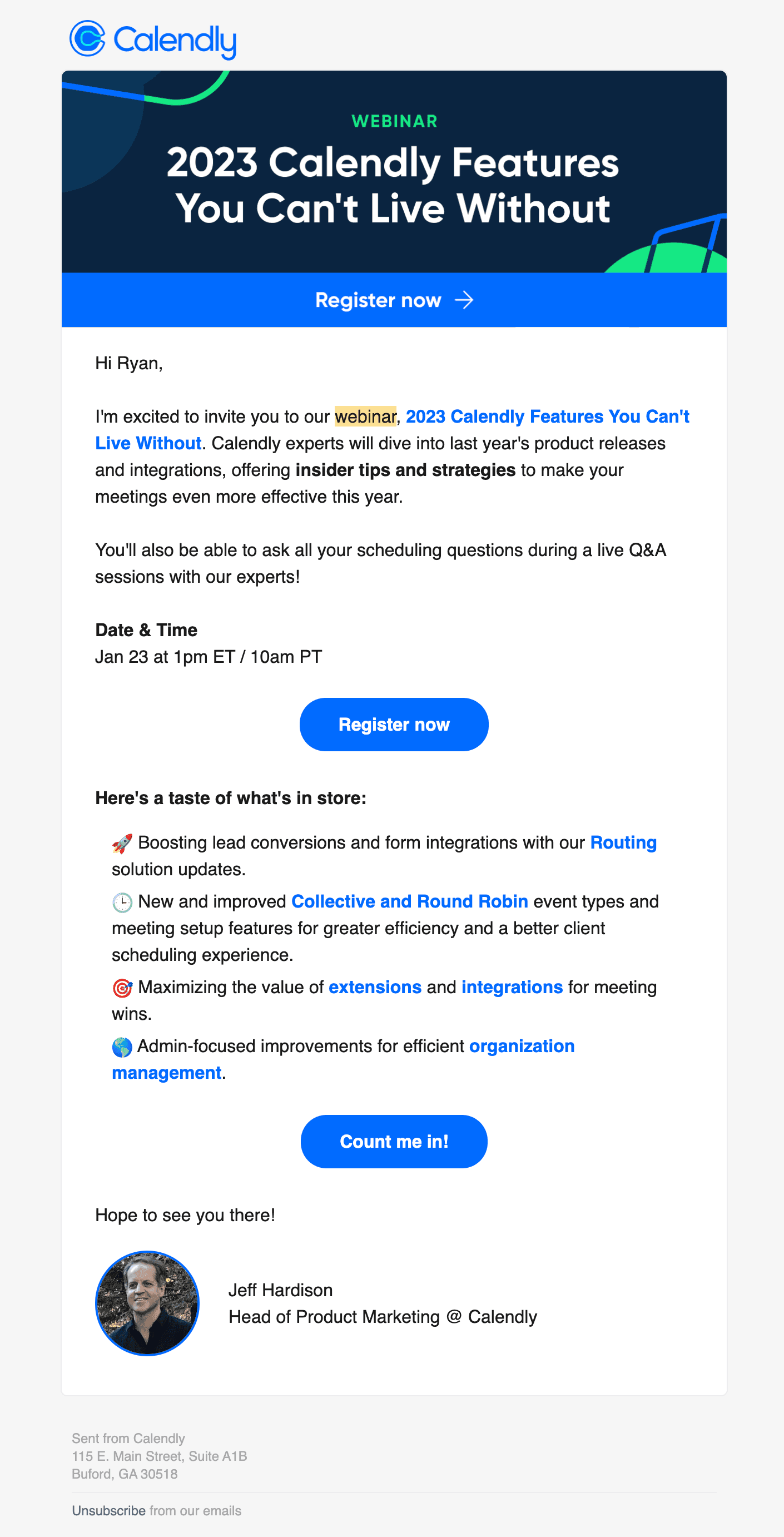
You’re Invited: Calendly’s 2023 Product Roundup!
Full email

Just the copy

You’re Invited: Calendly’s 2023 Product Roundup!

Calendly email example with subject line “You’re Invited: Calendly’s 2023 Product Roundup!”

Full email

Just the copy

You’re Invited: Calendly’s 2023 Product Roundup!

Calendly email example with subject line “You’re Invited: Calendly’s 2023 Product Roundup!”

Why we like it

Calendly sent a webinar invite email to share a recap of all of the features they released in the previous year. A recap webinar lets Calendly walk users through a year of releases they may have missed or underused. The email lists four topics, from Routing updates to admin improvements, promises a live Q&A, and closes with a second call to action, "Count me in!". It's signed by Jeff Hardison, Head of Product Marketing.

Calendly sent a webinar invite email to share a recap of all of the features they released in the previous year. A recap webinar lets Calendly walk users through a year of releases they may have missed or underused. The email lists four topics, from Routing updates to admin improvements, promises a live Q&A, and closes with a second call to action, "Count me in!". It's signed by Jeff Hardison, Head of Product Marketing.

[Webinar] Unveiling the 2024 Cybersecurity Report: Digital Trust Trends

Full email

Just the copy

[Webinar] Unveiling the 2024 Cybersecurity Report: Digital Trust Trends

DigiCert email example with subject line “[Webinar] Unveiling the 2024 Cybersecurity Report: Digital Trust Trends”

Full email

Just the copy

[Webinar] Unveiling the 2024 Cybersecurity Report: Digital Trust Trends

DigiCert email example with subject line “[Webinar] Unveiling the 2024 Cybersecurity Report: Digital Trust Trends”

Why we like it

DigiCert sent their webinar invitation email to promote the latest State of Digital Trust Report. The email opens with the panel of speakers, their headshots, and their titles. The copy then leads with a direct question, "Where do you fall?", and lists three things the March 6 session will cover. The call to action reads "SAVE MY SEAT" rather than "Register", which sounds more personal and inviting.

DigiCert sent their webinar invitation email to promote the latest State of Digital Trust Report. The email opens with the panel of speakers, their headshots, and their titles. The copy then leads with a direct question, "Where do you fall?", and lists three things the March 6 session will cover. The call to action reads "SAVE MY SEAT" rather than "Register", which sounds more personal and inviting.

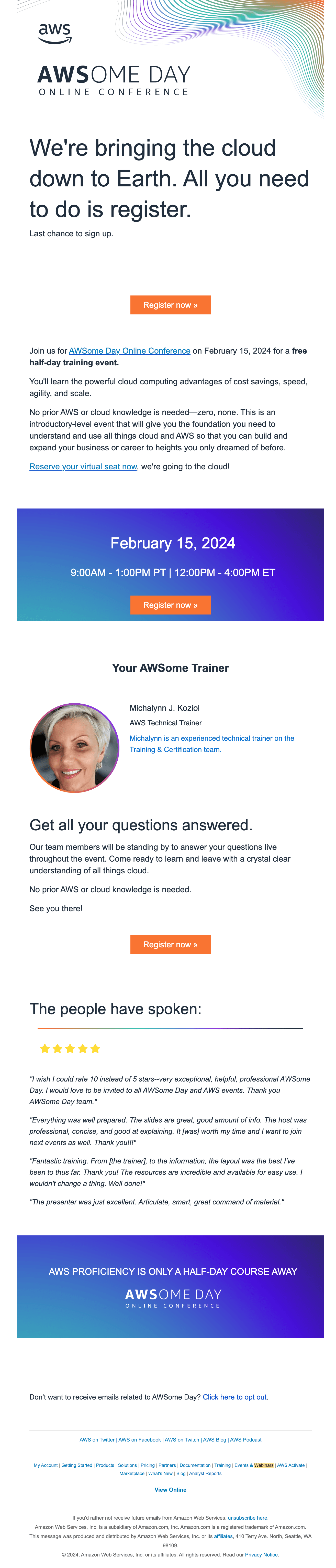
Last Chance | AWS proficiency is only a half-day course away
Full email

Just the copy

Last Chance | AWS proficiency is only a half-day course away

AWS email example with subject line “Last Chance | AWS proficiency is only a half-day course away”

Full email

Just the copy

Last Chance | AWS proficiency is only a half-day course away

AWS email example with subject line “Last Chance | AWS proficiency is only a half-day course away”

Why we like it

This email from AWS is more of a course than a webinar but the sentiment and goal remain the same. AWS names the trainer, Michalynn J. Koziol, with a headshot and a one-line bio, so attendees know who they'll be learning from. The same "Register now" call to action appears three times: at the top, after the date and time, and again just before four quotes from past attendees. AWS also brands the event as AWSome Day, a pun it repeats all the way down to "Your AWSome Trainer".

This email from AWS is more of a course than a webinar but the sentiment and goal remain the same. AWS names the trainer, Michalynn J. Koziol, with a headshot and a one-line bio, so attendees know who they'll be learning from. The same "Register now" call to action appears three times: at the top, after the date and time, and again just before four quotes from past attendees. AWS also brands the event as AWSome Day, a pun it repeats all the way down to "Your AWSome Trainer".

A webinar invitation email has one job: turn an inbox skim into a registration. The examples above from Airtable, Calendly, and AWS show the format.

What a good webinar invitation includes

  • A title that promises a specific outcome, "Cut onboarding time in half" beats "Product deep dive"

  • Date, time, timezone, and duration visible without scrolling

  • One CTA: register. Save the agenda detail for the landing page

  • Speaker names with one line of credibility each

  • A recording promise, for registrants who cannot attend live

Webinar invitation subject lines

  • Live on [date]: [specific outcome] in 30 minutes

  • [First name], save your seat for [topic]

  • How [Company] handles [problem] (live walkthrough)

  • Last chance to register: [webinar title]

An example webinar email sequence

Invitation, 7 to 14 days out. The pitch above.

Reminder, 24 hours before. Short: what, when, one-click add-to-calendar.

Reminder, 1 hour before. Include the join link and the start time.

Replay, within 24 hours after. Send the recording to every registrant with timestamps for the highlights, then a single follow-up CTA.

Webinar invitation email template

1. Invitation

Subject: Live on [date]: [outcome] in 30 minutes
Hi [First name], on [date] at [time] [timezone], [Speaker] from [Company] is showing how to [specific outcome]. In 30 minutes you'll see [point 1], [point 2], and [point 3]. Can't make it live? Register anyway and we'll send the recording. [CTA: Save my seat]

FAQ

How far in advance should you send a webinar invitation?
The example sequence above starts one to two weeks out. Test that timing with your audience and adjust it based on registrations and attendance.

How many reminder emails should a webinar have?
Two for registrants: 24 hours and 1 hour before. The 1-hour reminder carries the join link.

Are webinar emails marketing or transactional?
Treat a promotional invitation as marketing and include an unsubscribe link. Check the consent rules that apply: UK PECR and Canada’s CASL have specific consent conditions and exceptions. Confirmations and reminders for people who registered are transactional follow-through on their request.