

What is BIMI?
BIMI, or Brand Indicators for Message Identification, is a relatively new email standard that allows you to add your brand’s logo to your authenticated emails. Adopting BIMI will allow your brand’s logo to appear next to your emails in your recipient’s inbox without manually needing to add and maintain it on a provider by provider level. As long as the email client supports BIMI, your logo will appear.Which email providers support BIMI?
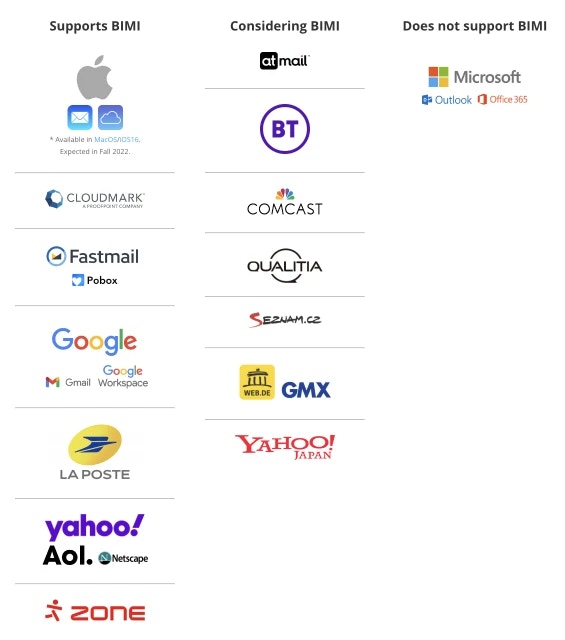
A growing number of email providers support BIMI. The current list of supported providers includes:- Gmail
- Google Workspace
- Apple Mail (macOS Ventura 13, iOS 16, and iPadOS 16, or later)
- AOL
- Netscape
- Fastmail
- Yahoo (Yahoo Japan is not currently supported but is under consideration for future adoption)
- Pobox
How does BIMI actually work?
Setting up BIMI will take a bit more work than simply uploading your brand’s logo and hitting save. Technically speaking, BIMI is configured with a DNS TXT record (your “BIMI record”) that points inbox providers to your hosted logo (and optionally your Verified Mark Certificate). At a broad level, after you send an email, your recipient’s email provider verifies your email authentication (SPF, DKIM, and DMARC). If those checks pass, the provider can look up your BIMI record to fetch and display your logo next to the message. To start, the sender (you) will need to ensure that you are DMARC compliant. DMARC (Domain-based Message Authentication, Reporting, & Conformance) is an email authentication policy and reporting protocol that defends against unauthorized use of domains. Basically, DMARC helps protect your brand by detecting emails that aren’t coming from your domain – preventing spoofing and phishing attempts. The email provider will also run through the Sender Policy Framework (SPF) and DomainKeys Identified Mail (DKIM) protocols to ensure that the sender’s email address was sent from the correct domain. Next, you will need to create the logo that will actually be used. The current recommendation is a square SVG file. The naming convention of this file should be:https://yourservername.com/logo.svg
Next is an optional but recommended step. To fully embrace BIMI, your brand should acquire a VMC, or a Verified Mark Certificate. This will help validate the true ownership of the logo being used. More on this in the section below.
The full implementation guide from BIMI can be located here.
BIMI requirements (high level)
Before BIMI can work, inbox providers generally require that you have strong email authentication in place:- SPF configured for your sending domain
- DKIM signing enabled
- DMARC set up with an enforcement policy (often
quarantineorreject)
How to set up BIMI (step-by-step)
- Make sure SPF and DKIM are set up and passing for your sending domain.
- Configure DMARC and move to an enforcement policy once you’re ready.
- Create a BIMI-compatible SVG logo and host it at a public URL.
- (Optional) Purchase a VMC if you want the strongest verification.
-
Add the BIMI TXT record to DNS (usually at
default._bimi.yourdomain.com) and reference your hosted logo (and VMC if you have one). For example:Notes:l=is the URL to your BIMI SVG logo.a=is optional and points to your VMC (Verified Mark Certificate).
- Validate your setup using the BIMI inspector.