> ## Documentation Index
> Fetch the complete documentation index at: https://loops.so/docs/llms.txt
> Use this file to discover all available pages before exploring further.
# Attachments
> How to send attachments with your transactional email.
Need to send attachments with your transactional email? Just [reach out to
us](https://app.loops.so/settings?page=support) and we can enable the feature on your account.
## Sending attachments
Check out [the transactional API documentation](/api-reference/send-transactional-email) for a refresher on the transactional API email payload.
To attach a file to a transactional message, you'll need to add a `attachments` key to the standard transaction API email payload. The `attachments` key should be an array of objects, each with the following keys:
* `filename` - the name of the file
* `contentType` - the MIME type of the file
* `data` - the base64 encoded content of the file
Here's an example of a transactional email payload with [this ICS file](https://gist.github.com/phil-loops/c0cb5d84d502a3949651934252d306af) attached:
```json theme={"dark"}
{
"transactionalId": "*********",
"email": "phil+attachments@loops.so",
"attachments": [
{
"filename": "oil-change-invite.ics",
"contentType": "text/calendar",
"data": "QkVHSU46VkNBTEVOREFSClZFUlNJT046Mi4wClBST0RJRDotLy9pY2FsLm1hcnVkb3QuY29tLy9pQ2FsIEV2ZW50IE1ha2VyCkNBTFNDQUxFOkdSRUdPUklBTgpCRUdJTjpWVElNRVpPTkUKVFpJRDpBbWVyaWNhL0xvc19BbmdlbGVzCkxBU1QtTU9ESUZJRUQ6MjAyMzA0MDdUMDUwNzUwWgpUWlVSTDpodHRwczovL3d3dy50enVybC5vcmcvem9uZWluZm8tb3V0bG9vay9BbWVyaWNhL0xvc19BbmdlbGVzClgtTElDLUxPQ0FUSU9OOkFtZXJpY2EvTG9zX0FuZ2VsZXMKQkVHSU46REFZTElHSFQKVFpOQU1FOlBEVApUWk9GRlNFVEZST006LTA4MDAKVFpPRkZTRVRUTzotMDcwMApEVFNUQVJUOjE5NzAwMzA4VDAyMDAwMApSUlVMRTpGUkVRPVlFQVJMWTtCWU1PTlRIPTM7QllEQVk9MlNVCkVORDpEQVlMSUdIVApCRUdJTjpTVEFOREFSRApUWk5BTUU6UFNUClRaT0ZGU0VURlJPTTotMDcwMApUWk9GRlNFVFRPOi0wODAwCkRUU1RBUlQ6MTk3MDExMDFUMDIwMDAwClJSVUxFOkZSRVE9WUVBUkxZO0JZTU9OVEg9MTE7QllEQVk9MVNVCkVORDpTVEFOREFSRApFTkQ6VlRJTUVaT05FCkJFR0lOOlZFVkVOVApEVFNUQU1QOjIwMjMwOTExVDE4NTY0M1oKVUlEOjE2OTQ0NTg1ODM0MzgtOTkyMjJAaWNhbC5tYXJ1ZG90LmNvbQpEVFNUQVJUO1RaSUQ9QW1lcmljYS9Mb3NfQW5nZWxlczoyMDI1MDUwMVQxMjAwMDAKRFRFTkQ7VFpJRD1BbWVyaWNhL0xvc19BbmdlbGVzOjIwMjUwNTAxVDEyMDAwMApTVU1NQVJZOkNoYW5nZSBPaWwKVVJMOmd1bWRyb3AuZXhhbXBsZS5jb20KREVTQ1JJUFRJT046WW91ciBjYXIgaXMgcmVhZHkgZm9yIGFuIG9pbCBjaGFuZ2UhCkxPQ0FUSU9OOkd1bWRyb3AgVmlsbGFnZQpFTkQ6VkVWRU5UCkVORDpWQ0FMRU5EQVI="
}
]
}
```
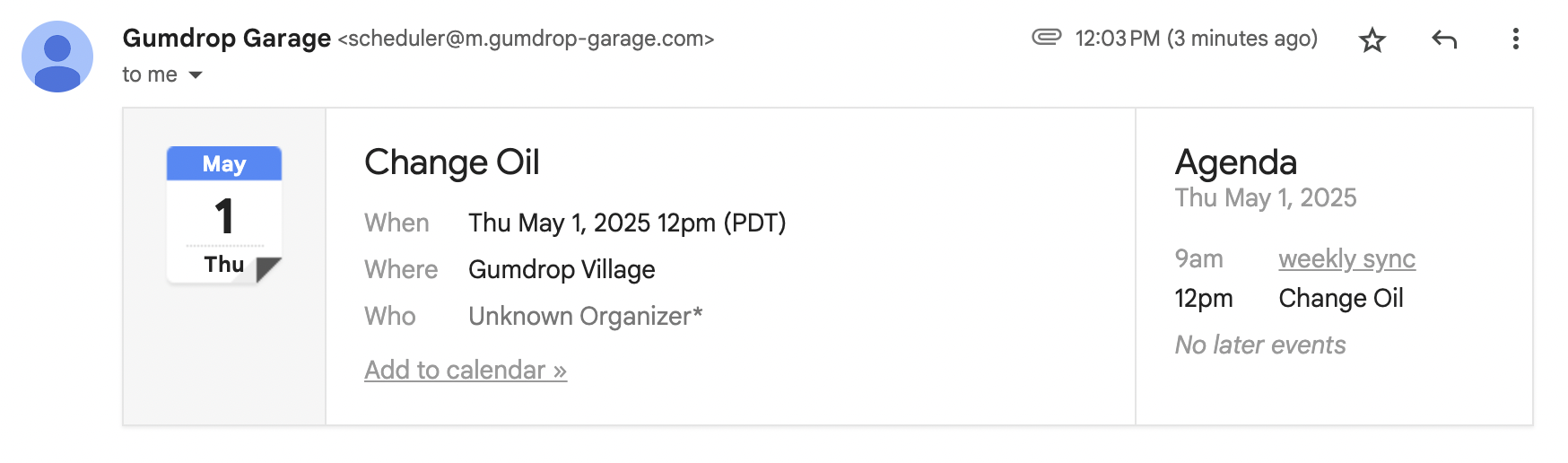
When you send this payload, the recipient will receive an email with the ICS file attached:
 All the usual [transactional API email
payload](/api-reference/send-transactional-email) keys are still required. The
`attachments` key is in addition to the standard payload.
## Limitations
* The total size of the JSON request body must be less than 4 MB. Keep in mind that attachments are base64 encoded, which increases file size by \~33%.
* Attachments are not generally available. Please [contact us](https://app.loops.so/settings?page=support) if you need this feature enabled on your account.
All the usual [transactional API email
payload](/api-reference/send-transactional-email) keys are still required. The
`attachments` key is in addition to the standard payload.
## Limitations
* The total size of the JSON request body must be less than 4 MB. Keep in mind that attachments are base64 encoded, which increases file size by \~33%.
* Attachments are not generally available. Please [contact us](https://app.loops.so/settings?page=support) if you need this feature enabled on your account.