> ## Documentation Index
> Fetch the complete documentation index at: https://loops.so/docs/llms.txt
> Use this file to discover all available pages before exploring further.
# Custom form
> Integrate with Loops via a form endpoint, which will work with any type of custom form solution you have set up.
Our form endpoint lets you add new contacts to your audience from an HTML form or using JavaScript.
## Find the form endpoint
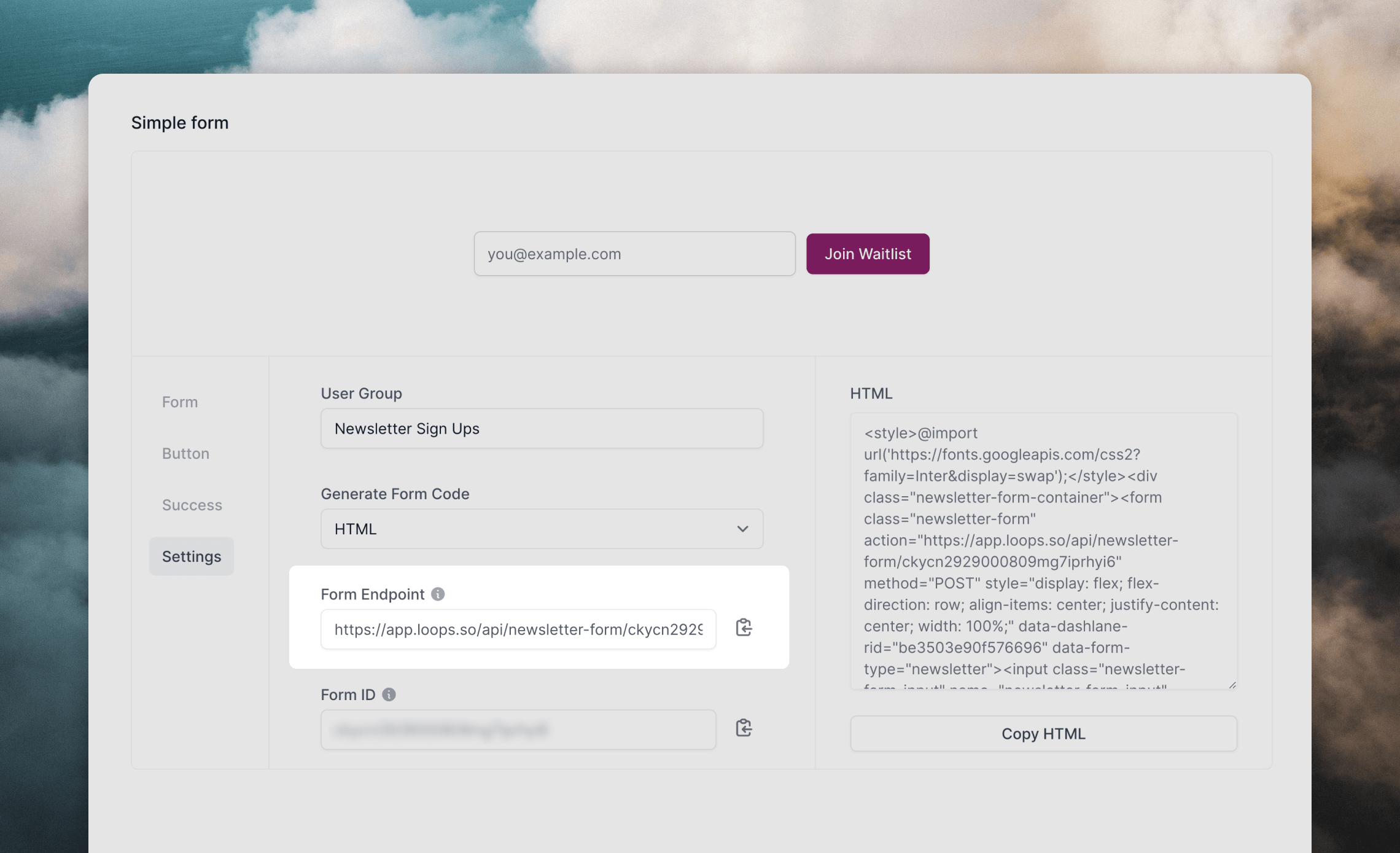
To submit data to Loops you will need to retrieve the form endpoint URL that's linked to your Loops account.
1. Go to the [Forms page](https://app.loops.so/forms) in your Loops account.
2. Click on the **Settings** tab.
3. Copy the URL shown in the **Form Endpoint** field.
 ## Create a form
In a form, add `input` elements for each of the contact properties you want to collect.
The following contact properties can be added to a new contact via a Loops form endpoint:
* Email `email`
* First name `firstName`
* Last name `lastName`
* User group `userGroup`
* Source `source` (default value is "Form" if omitted)
* Notes `notes`
* Mailing list subscriptions ([read more](/forms/custom-form#subscribe-to-mailing-lists))
The only contact property that can be updated on an existing contact via a form endpoint is `userGroup`.\
Existing contacts can be added to new mailing lists via a form, but not unsubscribed.
You can also use any [custom contact properties](/contacts/properties) from your [API settings page](https://app.loops.so/settings?page=api) in your form.
### Add contact properties
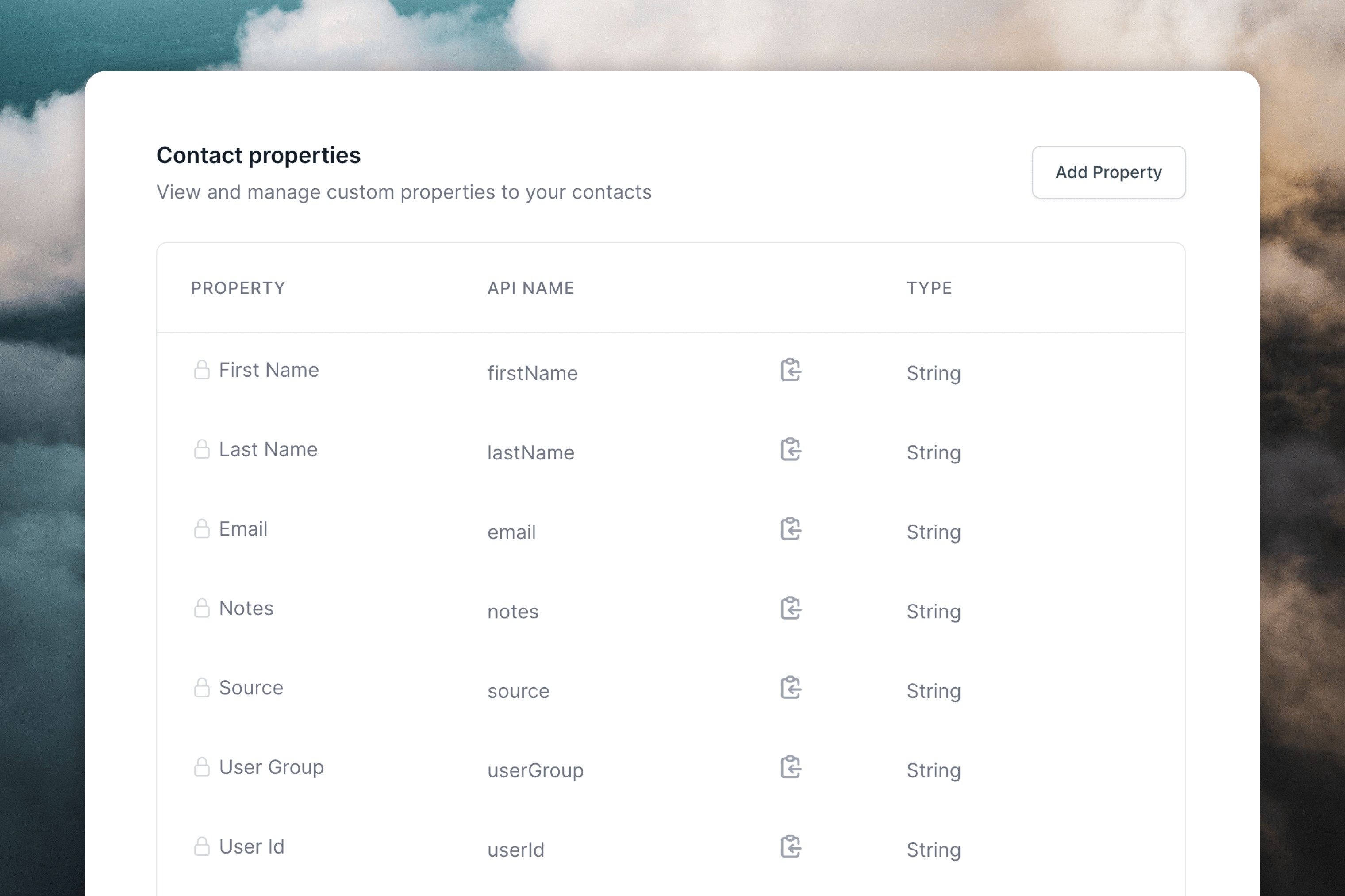
For each form field use the "API Name" value found from your [API settings page](https://app.loops.so/settings?page=api) as the `name` attribute.
## Create a form
In a form, add `input` elements for each of the contact properties you want to collect.
The following contact properties can be added to a new contact via a Loops form endpoint:
* Email `email`
* First name `firstName`
* Last name `lastName`
* User group `userGroup`
* Source `source` (default value is "Form" if omitted)
* Notes `notes`
* Mailing list subscriptions ([read more](/forms/custom-form#subscribe-to-mailing-lists))
The only contact property that can be updated on an existing contact via a form endpoint is `userGroup`.\
Existing contacts can be added to new mailing lists via a form, but not unsubscribed.
You can also use any [custom contact properties](/contacts/properties) from your [API settings page](https://app.loops.so/settings?page=api) in your form.
### Add contact properties
For each form field use the "API Name" value found from your [API settings page](https://app.loops.so/settings?page=api) as the `name` attribute.
 Here's a simple example form that collects name, email address and assigns a custom user group:
```HTML theme={"dark"}
```
### Subscribe to mailing lists
To add subscribers to mailing lists via a form endpoint, include a hidden field called `mailingLists`. You can use a single mailing list ID or to add subscribers to multiple lists, use a comma-separated list of mailing list IDs.
Make sure that any mailing list you add to a form is
[Public](/contacts/mailing-lists#list-types). You cannot subscribe contacts to
private mailing lists from the form endpoint.
```HTML {6} theme={"dark"}
```
If you need a hand integrating with your custom form, just [contact support](https://app.loops.so/settings?page=support) and we'll help you integrate with your specific setup.
## Submit with JavaScript
We recommend submitting forms using JavaScript because the endpoint responds with JSON.
To do this, make a `POST` request to your form endpoint. Make sure to set the `Content-Type` header to `application/x-www-form-urlencoded` and to submit the form body with encoded values.
```javascript Simple example theme={"dark"}
function handleSubmit() {
const formBody = `firstName=${encodeURIComponent(firstName)}&email=${encodeURIComponent(email)}&mailingLists=${encodeURIComponent(mailingListIds)}`;
// Change this URL to your own endpoint URL
fetch("https://app.loops.so/api/newsletter-form/", {
method: "POST",
body: formBody,
headers: {
"Content-Type": "application/x-www-form-urlencoded",
},
});
}
```
```javascript Detailed example theme={"dark"}
function handleSubmit() {
const formBody = `firstName=${encodeURIComponent(firstName)}&email=${encodeURIComponent(email)}&mailingLists=${encodeURIComponent(mailingListIds)}`;
try {
// Change this URL to your own endpoint URL
const response = await fetch("https://app.loops.so/api/newsletter-form/", {
method: "POST",
body: formBody,
headers: {
"Content-Type": "application/x-www-form-urlencoded",
},
});
if (response.status === 429) {
// Handle rate limit error
return {
success: false,
message: "Too many signups, please try again in a little while"
};
}
// Returns `success=true` or `success=false`, plus an error message if false
const data = await response.json();
return data;
} catch (error) {
return {
success: false,
message: "An error occurred. Please try again."
};
}
}
```
Responses from this form endpoint will be one of the following:
```json theme={"dark"}
HTTP 200
{
success: true
}
```
```json theme={"dark"}
HTTP 400 or 500
{
success: false,
message: "A descriptive error message."
}
```
## Troubleshooting
Submissions to form endpoints are rate limited to a low number of requests per minute from each IP address. The endpoint will return a `HTTP 429` response if requests exceed the rate limit. You should try to handle these responses gracefully in your form as shown in the example above.
Here's a simple example form that collects name, email address and assigns a custom user group:
```HTML theme={"dark"}
```
### Subscribe to mailing lists
To add subscribers to mailing lists via a form endpoint, include a hidden field called `mailingLists`. You can use a single mailing list ID or to add subscribers to multiple lists, use a comma-separated list of mailing list IDs.
Make sure that any mailing list you add to a form is
[Public](/contacts/mailing-lists#list-types). You cannot subscribe contacts to
private mailing lists from the form endpoint.
```HTML {6} theme={"dark"}
```
If you need a hand integrating with your custom form, just [contact support](https://app.loops.so/settings?page=support) and we'll help you integrate with your specific setup.
## Submit with JavaScript
We recommend submitting forms using JavaScript because the endpoint responds with JSON.
To do this, make a `POST` request to your form endpoint. Make sure to set the `Content-Type` header to `application/x-www-form-urlencoded` and to submit the form body with encoded values.
```javascript Simple example theme={"dark"}
function handleSubmit() {
const formBody = `firstName=${encodeURIComponent(firstName)}&email=${encodeURIComponent(email)}&mailingLists=${encodeURIComponent(mailingListIds)}`;
// Change this URL to your own endpoint URL
fetch("https://app.loops.so/api/newsletter-form/", {
method: "POST",
body: formBody,
headers: {
"Content-Type": "application/x-www-form-urlencoded",
},
});
}
```
```javascript Detailed example theme={"dark"}
function handleSubmit() {
const formBody = `firstName=${encodeURIComponent(firstName)}&email=${encodeURIComponent(email)}&mailingLists=${encodeURIComponent(mailingListIds)}`;
try {
// Change this URL to your own endpoint URL
const response = await fetch("https://app.loops.so/api/newsletter-form/", {
method: "POST",
body: formBody,
headers: {
"Content-Type": "application/x-www-form-urlencoded",
},
});
if (response.status === 429) {
// Handle rate limit error
return {
success: false,
message: "Too many signups, please try again in a little while"
};
}
// Returns `success=true` or `success=false`, plus an error message if false
const data = await response.json();
return data;
} catch (error) {
return {
success: false,
message: "An error occurred. Please try again."
};
}
}
```
Responses from this form endpoint will be one of the following:
```json theme={"dark"}
HTTP 200
{
success: true
}
```
```json theme={"dark"}
HTTP 400 or 500
{
success: false,
message: "A descriptive error message."
}
```
## Troubleshooting
Submissions to form endpoints are rate limited to a low number of requests per minute from each IP address. The endpoint will return a `HTTP 429` response if requests exceed the rate limit. You should try to handle these responses gracefully in your form as shown in the example above.