> ## Documentation Index
> Fetch the complete documentation index at: https://loops.so/docs/llms.txt
> Use this file to discover all available pages before exploring further.
# API Introduction
> Use the Loops REST API to manage contacts, send events, and send transactional email. Learn authentication, rate limits, and request/response examples.
You can use the Loops API to add contacts to your Loops audience,
update their attributes, and send events to Loops.
Prefer a no-code or low-code setup? Use our [integrations](/integrations) (like [Zapier](/integrations/zapier) or [Make](/integrations/make)), or trigger workflows using [incoming webhooks](/integrations/incoming-webhooks).
## Authentication
Your Loops API key should never be used client side or exposed to your end
users.
To get started, you'll need an API key. Go to [Settings -> API](https://app.loops.so/settings?page=api) in Loops and click **Generate key**.
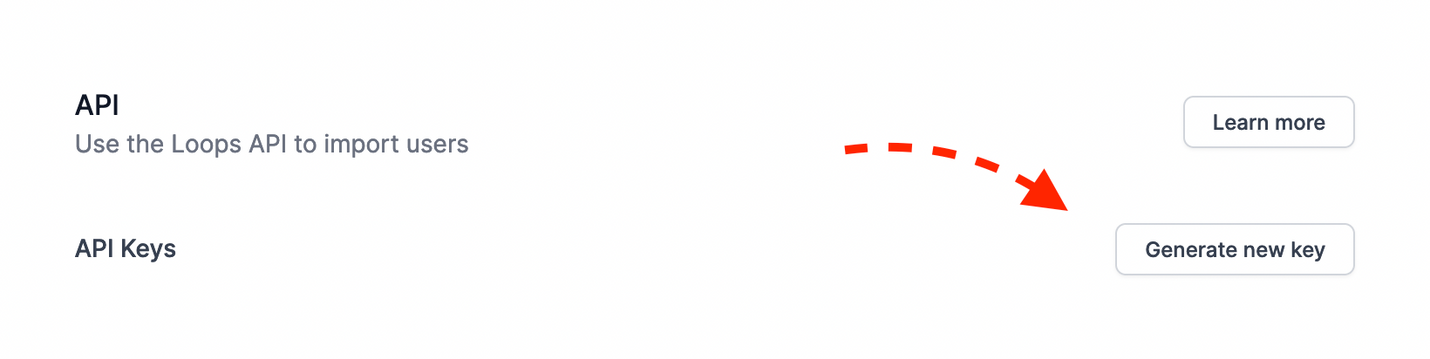 This creates an API key. You can assign it a human-readable name:
 We suggest using a different API key for different purposes. You can revoke an API key at any time with the trash icon.
When making an API call, add an Authorization header and set the API key as a Bearer token:
We suggest using a different API key for different purposes. You can revoke an API key at any time with the trash icon.
When making an API call, add an Authorization header and set the API key as a Bearer token:
 You can test your API key by making a `GET` request to
```
https://app.loops.so/api/v1/api-key
```
If successful, you will receive the following response:
```
{
"success": true,
"teamName": "Company name"
}
```
Here's an example Curl request (replace `d2d561f5ff80136f69b4b5a31b9fb3c9` with your own API key):
```bash theme={"dark"}
curl https://app.loops.so/api/v1/api-key -H "Accept: application/json" -H "Authorization: Bearer d2d561f5ff80136f69b4b5a31b9fb3c9"
```
## API Reference
The base URL for the API is `https://app.loops.so/api`
### API key
Test your API key.
### Contacts
Manage contacts.
### Contact properties
Manage contact properties.
### Mailing lists
View your mailing lists.
### Campaigns
Create and manage campaigns.
### Email messages
Email messages are the content of a campaign, loop or transactional email.
### Uploads
Upload images for email messages.
### Themes
Retrieve email themes.
### Components
Reusable components for your emails.
### Events
Send events to trigger workflows.
### Transactional emails
Send a transactional email.
### Configuration
## Rate Limiting
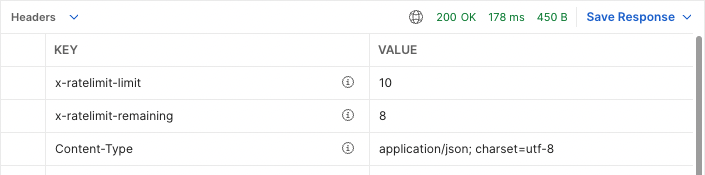
To ensure the quality of service for all users, our API is rate limited. This means there's a limit to the number of requests your application can make to our API in a certain time frame. The baseline rate limit is **10 requests per second per team**.
To see your current usage, we provide the following response headers in every API response:
* `x-ratelimit-limit`: The maximum number of requests you can make per second.
* `x-ratelimit-remaining`: The number of requests remaining in the current rate limit window.
Here is an example of a successful response with rate limit headers:
You can test your API key by making a `GET` request to
```
https://app.loops.so/api/v1/api-key
```
If successful, you will receive the following response:
```
{
"success": true,
"teamName": "Company name"
}
```
Here's an example Curl request (replace `d2d561f5ff80136f69b4b5a31b9fb3c9` with your own API key):
```bash theme={"dark"}
curl https://app.loops.so/api/v1/api-key -H "Accept: application/json" -H "Authorization: Bearer d2d561f5ff80136f69b4b5a31b9fb3c9"
```
## API Reference
The base URL for the API is `https://app.loops.so/api`
### API key
Test your API key.
### Contacts
Manage contacts.
### Contact properties
Manage contact properties.
### Mailing lists
View your mailing lists.
### Campaigns
Create and manage campaigns.
### Email messages
Email messages are the content of a campaign, loop or transactional email.
### Uploads
Upload images for email messages.
### Themes
Retrieve email themes.
### Components
Reusable components for your emails.
### Events
Send events to trigger workflows.
### Transactional emails
Send a transactional email.
### Configuration
## Rate Limiting
To ensure the quality of service for all users, our API is rate limited. This means there's a limit to the number of requests your application can make to our API in a certain time frame. The baseline rate limit is **10 requests per second per team**.
To see your current usage, we provide the following response headers in every API response:
* `x-ratelimit-limit`: The maximum number of requests you can make per second.
* `x-ratelimit-remaining`: The number of requests remaining in the current rate limit window.
Here is an example of a successful response with rate limit headers:
 If you exceed this limit, you'll receive a response with HTTP status `429 Too Many Requests`. Here is an example of a failed response with rate limit headers:
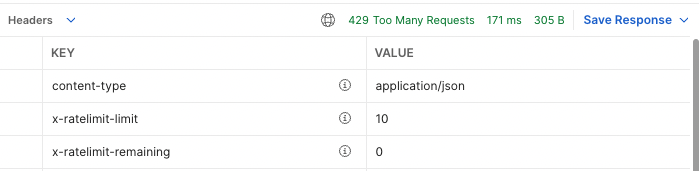 It's important to handle these 429 responses in your application. We recommend implementing retries with an exponential backoff strategy.
If your use case requires a higher limit, please [contact support](https://app.loops.so/settings?page=support) and we'll be happy to discuss your needs.
## Debugging
Sometimes things go wrong. Here are some tips to help you debug your API requests.
If you are having trouble with the API, we recommend using a tool like [Postman](https://www.postman.com/) to test your requests.
### Handling CORS errors
The Loops API does not support cross-origin requests made from client-side JavaScript. To avoid CORS errors, make sure to issue your requests from a server-side application.
### Dealing with `401 Unauthorized` "Invalid API key" errors
Make sure you have generated an API key from [Settings -> API](https://app.loops.so/settings?page=api) and that you are including it in your requests.
Your API key should be included in the "Authorization" header of your request, following the format `Authorization: Bearer YOUR_API_KEY`.
### Handling rate limiting (`429` Responses)
The Loops API allows a maximum of 10 requests per second per team. If you receive a `429 Too Many Requests` response, this means you have exceeded this limit.
The `x-ratelimit-limit` and `x-ratelimit-remaining` headers in the response can provide information about your current rate limit usage.
### Handling other `400`-level Responses
`400`-level responses typically indicate that there was a problem with the request. The response body will contain more information about what went wrong, so be sure to check it for details.
Check on your request type (GET, POST, PUT, DELETE) and ensure that you are using the correct one for the endpoint you are trying to access.
### "Some body key or value is longer than allowable"
If you receive this error, it means that a value in the request body is too long. We support a maximum of 500 characters for each value, including the opening and closing quotes. Please reduce the length of the values in your request and try again.
***
If you have followed these steps and are still experiencing issues, don't hesitate to [reach out to the Loops team](https://app.loops.so/settings?page=support) for further assistance.
## OpenAPI spec
Get started quickly with the Loops API using our OpenAPI documents.
You can import these documents into an API client like Postman or Insomnia to see and use all of our endpoints, with example requests and expected responses.
* **YAML:** [app.loops.so/openapi.yaml](https://app.loops.so/openapi.yaml)
* **JSON:** [app.loops.so/openapi.json](https://app.loops.so/openapi.json)
## SDKs
SDKs are software packages built on top of the API, making it easier to integrate into your project.
The official Go SDK for Loops.
The official JavaScript/TypeScript SDK for Loops.
} href="/sdks/nuxt">
The official Nuxt module for Loops.
The official PHP SDK for Loops.
} href="/sdks/ruby">
The official Ruby SDK for Loops.
### Unofficial SDKs
The following SDKs are community-submitted and have not been officially reviewed or endorsed by Loops. We recommend thoroughly testing and reviewing the code before integrating it into your project.
* [Laravel](https://github.com/plutolinks/laravel-loops) by PlutoLinks
* [PHP](https://github.com/plutolinks/loops-php) by PlutoLinks
* [Ruby on Rails](https://github.com/danielfriis/loops_rails) by Daniel Friis
[Submit an SDK](mailto:dan@loops.so)
It's important to handle these 429 responses in your application. We recommend implementing retries with an exponential backoff strategy.
If your use case requires a higher limit, please [contact support](https://app.loops.so/settings?page=support) and we'll be happy to discuss your needs.
## Debugging
Sometimes things go wrong. Here are some tips to help you debug your API requests.
If you are having trouble with the API, we recommend using a tool like [Postman](https://www.postman.com/) to test your requests.
### Handling CORS errors
The Loops API does not support cross-origin requests made from client-side JavaScript. To avoid CORS errors, make sure to issue your requests from a server-side application.
### Dealing with `401 Unauthorized` "Invalid API key" errors
Make sure you have generated an API key from [Settings -> API](https://app.loops.so/settings?page=api) and that you are including it in your requests.
Your API key should be included in the "Authorization" header of your request, following the format `Authorization: Bearer YOUR_API_KEY`.
### Handling rate limiting (`429` Responses)
The Loops API allows a maximum of 10 requests per second per team. If you receive a `429 Too Many Requests` response, this means you have exceeded this limit.
The `x-ratelimit-limit` and `x-ratelimit-remaining` headers in the response can provide information about your current rate limit usage.
### Handling other `400`-level Responses
`400`-level responses typically indicate that there was a problem with the request. The response body will contain more information about what went wrong, so be sure to check it for details.
Check on your request type (GET, POST, PUT, DELETE) and ensure that you are using the correct one for the endpoint you are trying to access.
### "Some body key or value is longer than allowable"
If you receive this error, it means that a value in the request body is too long. We support a maximum of 500 characters for each value, including the opening and closing quotes. Please reduce the length of the values in your request and try again.
***
If you have followed these steps and are still experiencing issues, don't hesitate to [reach out to the Loops team](https://app.loops.so/settings?page=support) for further assistance.
## OpenAPI spec
Get started quickly with the Loops API using our OpenAPI documents.
You can import these documents into an API client like Postman or Insomnia to see and use all of our endpoints, with example requests and expected responses.
* **YAML:** [app.loops.so/openapi.yaml](https://app.loops.so/openapi.yaml)
* **JSON:** [app.loops.so/openapi.json](https://app.loops.so/openapi.json)
## SDKs
SDKs are software packages built on top of the API, making it easier to integrate into your project.
The official Go SDK for Loops.
The official JavaScript/TypeScript SDK for Loops.
} href="/sdks/nuxt">
The official Nuxt module for Loops.
The official PHP SDK for Loops.
} href="/sdks/ruby">
The official Ruby SDK for Loops.
### Unofficial SDKs
The following SDKs are community-submitted and have not been officially reviewed or endorsed by Loops. We recommend thoroughly testing and reviewing the code before integrating it into your project.
* [Laravel](https://github.com/plutolinks/laravel-loops) by PlutoLinks
* [PHP](https://github.com/plutolinks/loops-php) by PlutoLinks
* [Ruby on Rails](https://github.com/danielfriis/loops_rails) by Daniel Friis
[Submit an SDK](mailto:dan@loops.so)